Audit trail
Every agent keeps an audit trail: a record of what it allowed, what it ran and what it refused. It is on from the first start, and there is nothing to set up.
It records who did what, and what was decided. It never stores what anyone wrote: a message or a reply goes into the trail only as its SHA-256 hash. Commands are the exception, because approving a command is the thing being audited, so they are recorded in full.
What is recorded
Section titled “What is recorded”| Entries | |
|---|---|
| Sign-in and access | every refused sign-in and every refused operation. An allowed one is recorded once an hour for the same person and operation, because the check runs on every request. |
| Conversations | when each turn starts and ends, which engine answered, how long it took, and who the session belongs to. The message and the reply appear only as hashes. |
| Commands | in conversations and HexaPilot jobs: every approval or refusal a person gives, and every command the agent checked or ran. An approval and the command it allowed carry the same request id. |
| Other agents | calls in and out, who was admitted or refused, requests passed on, calls to an API behind the agent, and each OAuth check |
| Consent and sign-out | terms accepted or withdrawn, and idle sign-outs |
| The agent itself | at each start: its version, the SHA-256 of the running binary, a fingerprint of every settings and policy file, and the controls in force. While it runs, any change to one of those files is recorded with its old and new hash. |
| Security events | a key that failed the agent’s check, a store that would not open or was restored, ten refusals for one caller within a minute, a public address that stopped reaching the agent and was replaced |
| Heartbeat | every five minutes, from each of the agent’s processes |
Why you can trust it
Section titled “Why you can trust it”- Sealed. Each entry is encrypted (AES-256-GCM) with a key that only this agent’s identity can obtain. Only the owner, in the agent’s folder, can read the trail.
- Chained. Each entry carries the hash of the one before it, and a sealed head file holds the number and hash of the last entry. If a line is removed or edited, the chain breaks. If the end is cut off, it no longer matches the head. A single changed byte stops the line from decrypting.
- Never in the way. Entries are written in the background, so recording never slows a turn down. If the disk is full, entries wait and are written once there is room.
- Never deleted. The agent does not delete trail files. How long you keep them, or your SIEM’s copy, is your decision.
The trail lives in the agent’s folder, in audit/, one file per day for each of the agent’s
processes.
Export and verify
Section titled “Export and verify”From the agent’s folder:
cd ~/heia-agent./hexaeight-agent-linux-x64 audit-export > trail.jsonlOn macOS the binary is hexaeight-agent-osx-arm64. Run the export while the agent is running or
stopped, but not while it is starting.
The export decrypts every entry, checks every chain against its head, and writes one JSON line per entry in time order. A person’s address is added to every row of their session. The verdict is printed separately:
OK 'main': 1234 entries, chain verifiedRESULT every chain verifiedA problem appears as a BROKEN line naming the file and line, and the command exits with status 2.
| Option | What it does |
|---|---|
--from 2026-10-01 · --to 2026-10-31 | a date range |
--session <id> | one work session (every entry of a session carries its id) |
--router-usage ~/heia-router/usage.jsonl | adds the router’s model calls for the same sessions: model, tokens and time |
A real export
Section titled “A real export”The question about annual leave from the workspace tour, exported with the router’s calls joined in. This is real output: the email addresses and one folder name are blurred, nothing else is changed.
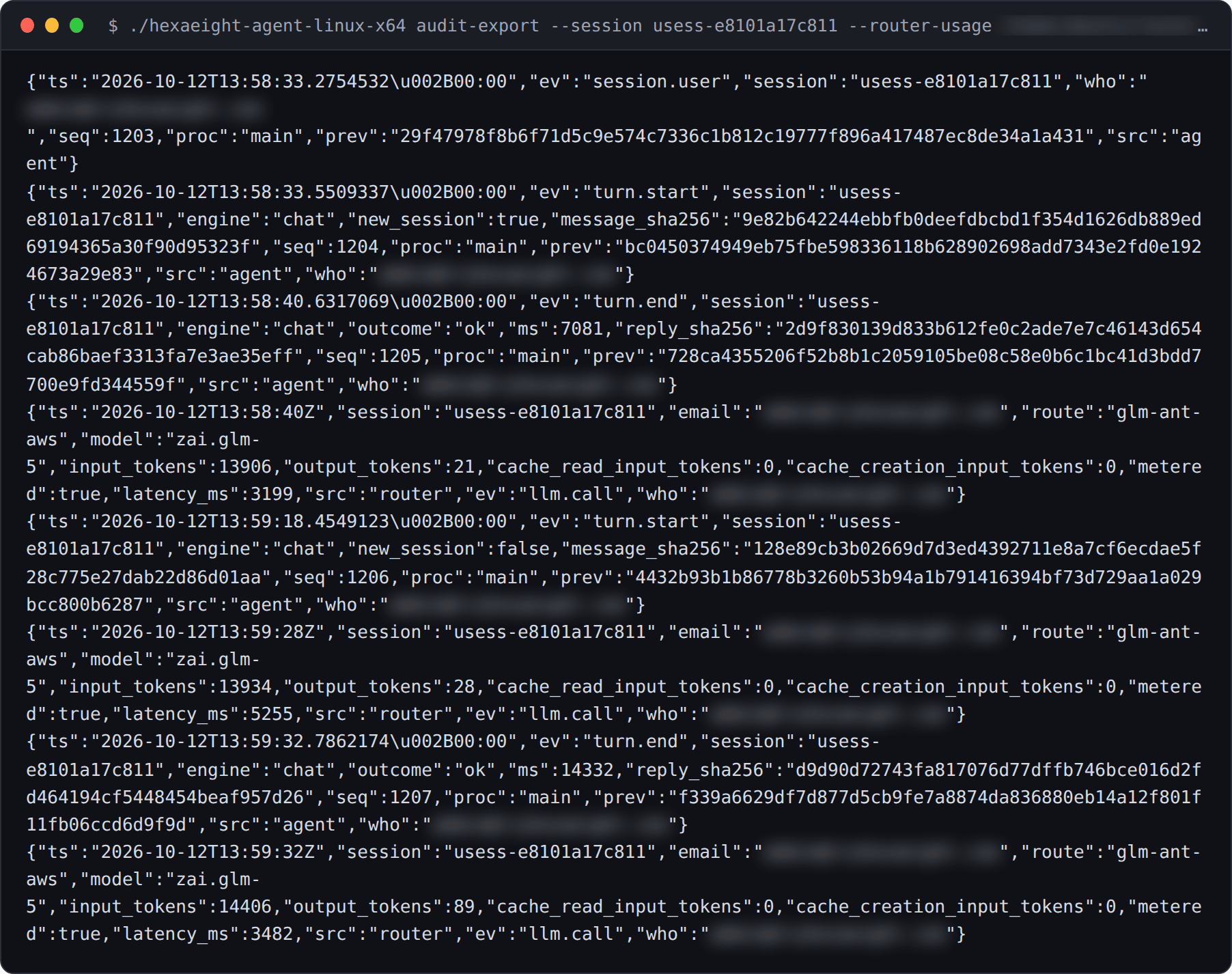
Read from the top, the first turn says:
| time (UTC) | entry | what it records |
|---|---|---|
| 13:58:33 | session.user | whose session this is |
| 13:58:33 | turn.start | a turn began on the chat engine. The question appears only as its SHA-256 hash |
| 13:58:40 | turn.end | the turn finished ok in 7.1 seconds. The reply appears only as its hash |
| 13:58:40 | llm.call | from the router: route glm-ant-aws, model zai.glm-5, 13,906 tokens in and 21 out, 3.2 seconds |
seq and prev are the chain: each entry carries its number and the hash of the entry before it.
Send it to your SIEM
Section titled “Send it to your SIEM”The agent can push the trail to your log pipeline as it is written, as one HTTPS POST of JSON entries with one header of your choice. Any collector that accepts that will work, for example Splunk (the HEC raw endpoint), Datadog, Sumo Logic, or the HTTP input of Logstash, Fluent Bit, Vector or Cribl.
From the agent’s folder:
./hexaeight-agent-linux-x64 audit-sink set # asks for the URL and one header; the values are not shown./hexaeight-agent-linux-x64 audit-sink test # sends one test event: OK, or FAILED with the HTTP status./hexaeight-agent-linux-x64 audit-sink off # stops sending; the setting is kept, and set turns it on again- HTTPS only. Plain HTTP is accepted only for a collector on the same machine.
- Newline-delimited JSON by default.
set --format json-arraysends a JSON array instead. - No restart. The running agent picks up a change within a minute.
- Nothing lost, nothing out of order. The agent moves on only after your collector accepts a batch.
After an outage or a restart it resumes where it stopped. Each entry has an
id, so your collector can drop one that arrives twice. - The setting stays secret. The URL, the header and its value are sealed in the agent’s folder,
not in
hexaeight-agent.json, and no command or log line ever shows them.
Your collector receives each entry as readable JSON, with the agent’s name added. HTTPS protects the entries on the way.
The router keeps one too
Section titled “The router keeps one too”The router records who each session is for, every model call (route, model, tokens and time taken) and every refusal, using the same session id as the agent, so the two join up. It has the same commands, run from the router’s folder:
cd ~/heia-router./hexaeight-router-linux-x64 audit-export > router-trail.jsonl./hexaeight-router-linux-x64 audit-sink setTurning it off
Section titled “Turning it off”"audit": false in hexaeight-agent.json turns the agent’s trail off from the next start. The
compliance reports then show it as a gap.
- Compliance reports: what is in force, read from this trail
- Admin settings: who may sign in, idle sign-out, privacy notice and consent