4 · Connect the workspace
The agent and router are both running, but you have no way to talk to them yet. The workspace is that: a browser interface for conversations, the documents the agent can search, and a record of what it has done.
It runs on your machine, under your identity. There is no tenant, and no copy of your conversation anywhere else.
Install and start it
Section titled “Install and start it”cd my-agenthexaeight-activate install-workspacehexaeight-activate restart workspaceThen open the address it prints — a localhost URL on the machine running the agent.
If you have edited
config.js, back it up first.install-workspace --forceoverwrites it.
Sign in
Section titled “Sign in”Sign in with the owner address — the one you put in hexaeight-agent.json in step 2.
Sign-in and permission are the same identity on purpose: the address you sign in with is the address every permission rule is written against.
| licence | workspace sign-in |
|---|---|
| Personal | the owner’s address only |
| Business | multiple addresses |
This is a limit on the workspace, not on your agents. A personal licence can still serve unlimited users, free — see Your own users.
If sign-in fails, it is almost always one of two things:
| symptom | cause |
|---|---|
| you cannot sign in at all | owner missing from hexaeight-agent.json, or the baseline policy was never written |
| you sign in but nothing works | the owner has no op:* outbound rule — see Policy |
What you are looking at
Section titled “What you are looking at”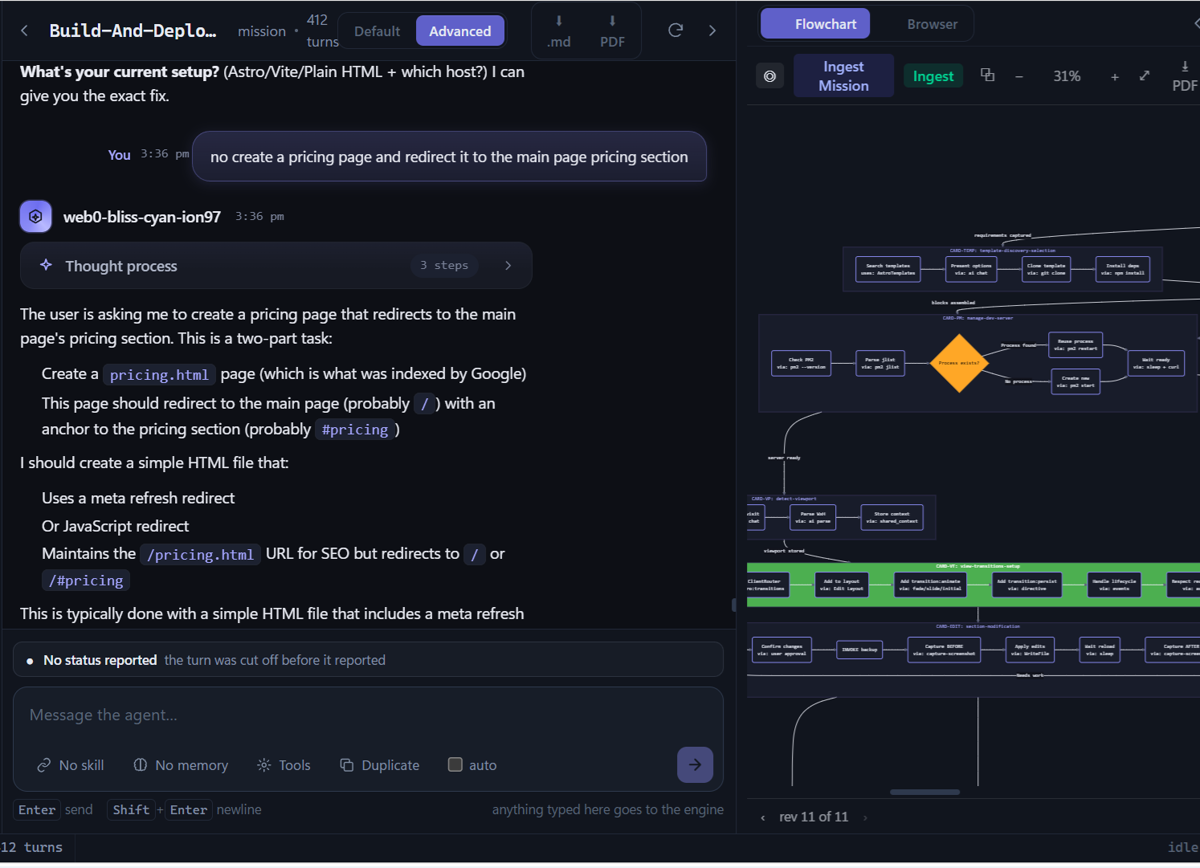
Three columns. Engines and sessions on the left, the conversation in the middle, and whatever that conversation produced on the right.
That right-hand panel is the part people do not expect. In a mission session it is the thing
being built — a page, a flow, an app — rendered as it emerges from the conversation, with revision
history underneath (rev 11 of 11). You talk; it takes shape.
Engines — what the agent can do
Section titled “Engines — what the agent can do”Every session runs on an engine, and the engine decides what kind of work you get:
| engine | what it is for |
|---|---|
| chat | ordinary conversation, with whatever memories you attach |
| mission | building something inside a session — describe what you want and it builds it, with the work appearing beside the conversation as it goes |
You pick one when you start a session. The number beside each is how many sessions you have on it.
The screenshot above is a mission session: the conversation on the left is a person asking for a pricing page, and the panel on the right is the app taking shape as they talk. Nothing was scaffolded first — the session is the build.
You may also see
harnessandmindmapchatin the list. Those are the earlier agentic-skills approach, kept for sessions that already use them. Memories and sealed APIs have superseded that path, and there is no reason to start something new on one.
Where your own work fits
Section titled “Where your own work fits”This is the part worth seeing whole. The agent is an identity and a policy boundary, and what sits behind it is your choice:
hexaeight-harness-engine is the batteries-included runtime, and what chat and mission run
on. It comes with the agent and brings the memories, the tool loop and the session record — nothing
to assemble.
Do not confuse it with the
harnessengine in the session list, which is the older skills-based approach and is no longer recommended.
Your own engine is the other path, and the one the rest of the platform is built around. An engine is a process the agent runs — you declare its argv and which JSON fields carry the reply — in any language, and the agent wraps it in exactly the same identity, policy and session handling — see Bring your own engine.
If you only want to expose an existing HTTP service to other agents, An API you already run is the shorter path.
Either way the agent never holds a model credential. It asks the router for a route.
Documents — what it can search
Section titled “Documents — what it can search”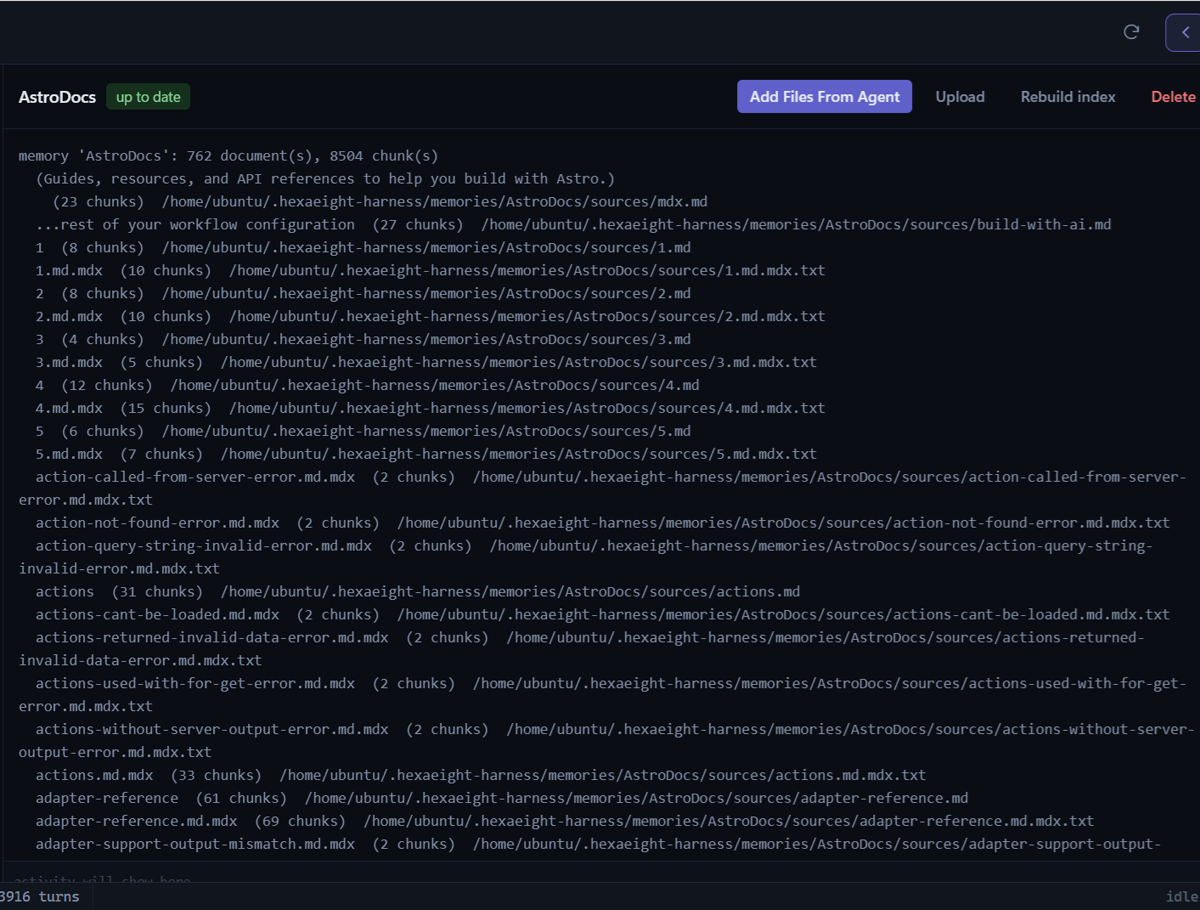
A memory is a named body of documents the agent can search. This pane is where you add and manage them.
| control | what it does |
|---|---|
| Add Files From Agent | ingest from a path the agent can reach |
| Upload | send files from this browser |
| Rebuild index | re-read everything and rebuild — the fix when an edit is not being found |
| Delete | remove the memory |
The header shows what is actually in it — 762 document(s), 8504 chunk(s) — and whether it is up
to date. Each line below is one source file and how many chunks it produced, so you can see at a
glance whether a document was ingested as you expected.
Full detail in Documents it can search.
Using a memory in a conversation
Section titled “Using a memory in a conversation”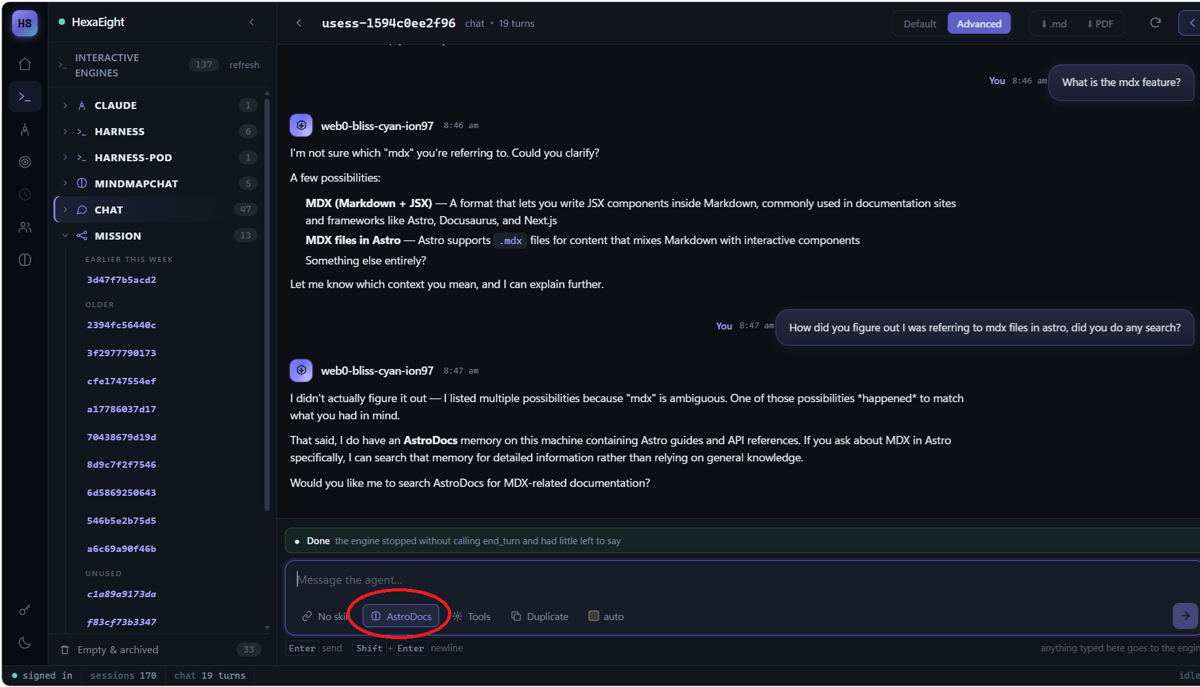
Attach a memory to a session with the selector under the message box — here, AstroDocs. The agent
then knows that corpus is available and will search it rather than answer from general knowledge.
The exchange above is worth reading closely, because it shows the behaviour you want:
“I didn’t actually figure it out — I listed multiple possibilities because ‘mdx’ is ambiguous… That said, I do have an AstroDocs memory on this machine. Would you like me to search it?”
It separated what it knew from what it guessed, and offered the corpus rather than inventing an answer. That is what attaching a memory buys you.
An agent can have many memories. Attach the one the question belongs to; the description you gave each corpus is how the agent tells them apart.
Sessions — the record
Section titled “Sessions — the record”Every session is kept: the conversation, what the agent did, and what it produced. The left column lists them by recency, and the header shows the session id and its turn count.
Each session can be exported with the .md and PDF buttons.
Where the accounting is
Section titled “Where the accounting is”There is no separate billing screen, because there does not need to be one. Every session leaves a
JSONL trail — one line per turn, holding what was asked, what the engine did, and the token counts
it reported. The router keeps its own usage.jsonl alongside it.
That is the accounting: a readable, per-session record you can total however you like, attributable to a proven identity rather than to a shared key.
It is a client, not the agent
Section titled “It is a client, not the agent”The workspace holds no identity and no model credentials of its own. It talks to the agent over the same authenticated channel as anything else.
Closing it does not stop the agent. Anything running continues; you have only closed the window.
Next: 5 · Your first conversation — confirm the whole path works end to end.